

Frequently asked questions
Can’t find your answer? Write to morphe-support@vooban.com.
Signing in and accounts
Section titled “Signing in and accounts”Can I sign in with a Microsoft account, or only Google?
Section titled “Can I sign in with a Microsoft account, or only Google?”Both. Sign in with Google or Microsoft single sign-on (SSO), using the email address you were invited with. If you couldn’t sign in with a Microsoft account before, ask for your invitation to be sent again.
Microsoft sign-in (SSO) says the app needs an administrator’s approval
Symptom. You sign in with your Microsoft account and the sign-in is blocked: a message says Morphe must be approved by an administrator in your organization.
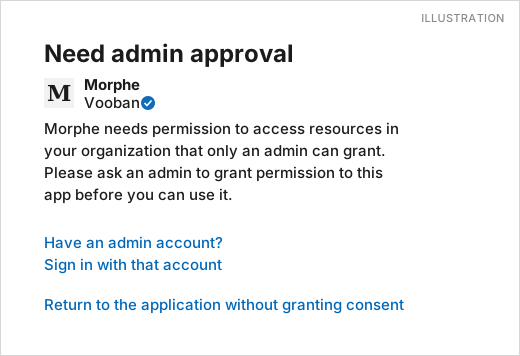
Cause. Your organization’s IT restricts which outside apps employees can sign in to with their Microsoft account (Microsoft Entra ID). Until an administrator approves Morphe for your organization (this is called “admin consent”), nobody can sign in to it with that account. Nothing is broken on Morphe’s side: the setting lives in your organization.
Two ways out:
- Get Morphe approved. Ask your IT team to grant admin consent to Morphe for your organization. Ideally, ask before your first sign-in.
- Use another email address. Sign in with another address invited to Morphe, for example a Google account. Ask the person who invited you, or support, to send the invitation to that address.
I don’t receive my invitation email, or the invitation doesn’t work.
Section titled “I don’t receive my invitation email, or the invitation doesn’t work.”The most common cause is a duplicate invitation (two invitations, or one invitation in two organizations). Make sure you open the most recent one. Otherwise, write to morphe-support@vooban.com and support will send you a fresh invitation.
An invited employee doesn’t receive the email giving access to their topics.
Section titled “An invited employee doesn’t receive the email giving access to their topics.”Contact support with the person’s email address. The team checks the invitation and sends it again.
Invitations and user management
Section titled “Invitations and user management”An invitation is rejected as “invalid email”.
Section titled “An invitation is rejected as “invalid email”.”The address contains an extra character, for example a “>” copied along with it. Invite the person again, typing the address without the extra character.
When you say “expert”, do you mean someone from Vooban or from our company?
Section titled “When you say “expert”, do you mean someone from Vooban or from our company?”Someone from your company: the person whose knowledge is being captured. You invite them yourself by adding an employee.
Can we change the email address of an employee already invited to a capture?
Section titled “Can we change the email address of an employee already invited to a capture?”Not by yourself: the email address is tied to the sign-in account. Write to support with the old and the new address, and the team will handle it.
Do we need an integration with our Azure AD / Entra ID?
Section titled “Do we need an integration with our Azure AD / Entra ID?”No, no integration is required. People sign in with Google or Microsoft and the invited email address, with no setup by your IT team. The one exception: if your organization restricts outside apps, an administrator must approve Morphe.
Recording sessions
Section titled “Recording sessions”I click “Start” and nothing happens.
Section titled “I click “Start” and nothing happens.”This happens when the session is started through a remote desktop connection (RDP), where the microphone isn’t available. Start the session directly on your own computer, with the microphone and camera allowed in the browser.
I hung up in the middle of a session and the topic was marked “Done”. How do I resume it?
Section titled “I hung up in the middle of a session and the topic was marked “Done”. How do I resume it?”Mark the topic as not done, create a new session, then drag the topic into that empty session: the “Start” button becomes active as soon as it holds a topic. The agent kept the previous conversation and picks up where it left off.
My new session stays “pending” and I can’t start it.
Section titled “My new session stays “pending” and I can’t start it.”A session only starts when it holds at least one topic. Drag a topic into it.
An error message appears during the recording.
Section titled “An error message appears during the recording.”In the cases reported to us, this message had no effect on the capture. Send a screenshot to support so we can look into it.
Viewing and sharing knowledge
Section titled “Viewing and sharing knowledge”How do I save, print or export the captured information?
Section titled “How do I save, print or export the captured information?”You view it in the app: the structured information is readable there directly, and the chat lets you ask questions of the knowledge base. Exporting the information out of the platform isn’t possible for now.
Can I invite colleagues to ask the AI questions about my recordings?
Section titled “Can I invite colleagues to ask the AI questions about my recordings?”Yes, that’s exactly what it’s for: invite them to the platform and they ask the knowledge base their questions through the chat.
Can I ask Claude, ChatGPT or Copilot about our knowledge bases?
Section titled “Can I ask Claude, ChatGPT or Copilot about our knowledge bases?”Yes. Morphe connects to AI assistants through MCP, read-only and with your own access. Connect Morphe to your AI assistant walks through Claude, ChatGPT, Codex and Microsoft 365 Copilot.
Security and privacy
Section titled “Security and privacy”Does our IT team need to approve or integrate anything?
Section titled “Does our IT team need to approve or integrate anything?”There’s nothing to integrate in Azure AD / Entra ID or any other directory: people sign in with their existing Google or Microsoft account. If your organization restricts outside apps, an administrator must approve Morphe. A technical contact at Vooban can support your IT team’s approval process: ask support.